
We are pleased to announce the new version 2.1.0 of DataGerry! Get your downloads here: Download DataGerry.
These are the new functions of DataGerry Update 2.1.0 in detail:
DataGerry Section Templates
The new ‘Section Templates’ function allows users to create customised sections and insert them into type configurations using drag & drop. The feature is useful when the same group of fields (a section) is used for different types. Section templates speed up the creation and modification of types and make it unnecessary to create recurring sections for types from scratch again and again.
The new“Section Templates” can be found in DataGerry at the top right under Framework => Section Templates.
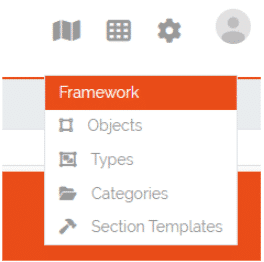
Image: Access to section templates
In the section templates overview, all created templates are displayed with their PublicID, name, type and the corresponding actions (more on this later). In the top left-hand corner of the table is the ‘Add’ button, which can be used to create new section templates.
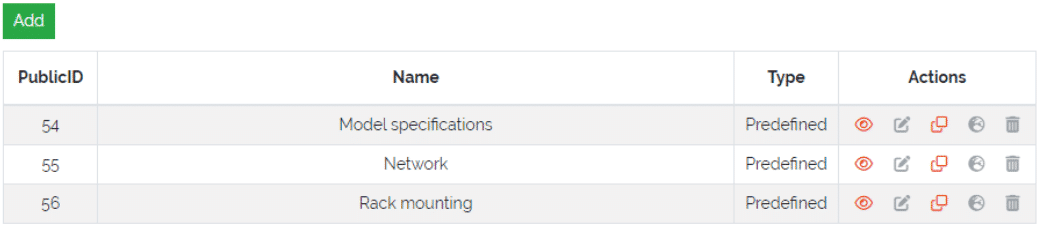
Image: Overview of the section templates
Creating section templates
In this form, a section template can be created in the same way as in the type configuration by dragging and dropping elements from the ‘Controls’ sidebar into the ‘Fields’ area of the section. The only control that is not available for section templates is the special control Location, as a type can only have one of these controls and can therefore only be set directly in the type configuration. In addition, there is a checkbox in the header of the section in which the template can be defined as a global template (more on this topic later). This cannot be changed when editing a section template. If the checkbox is not ticked, the template created is of the ‘Standard’ type.
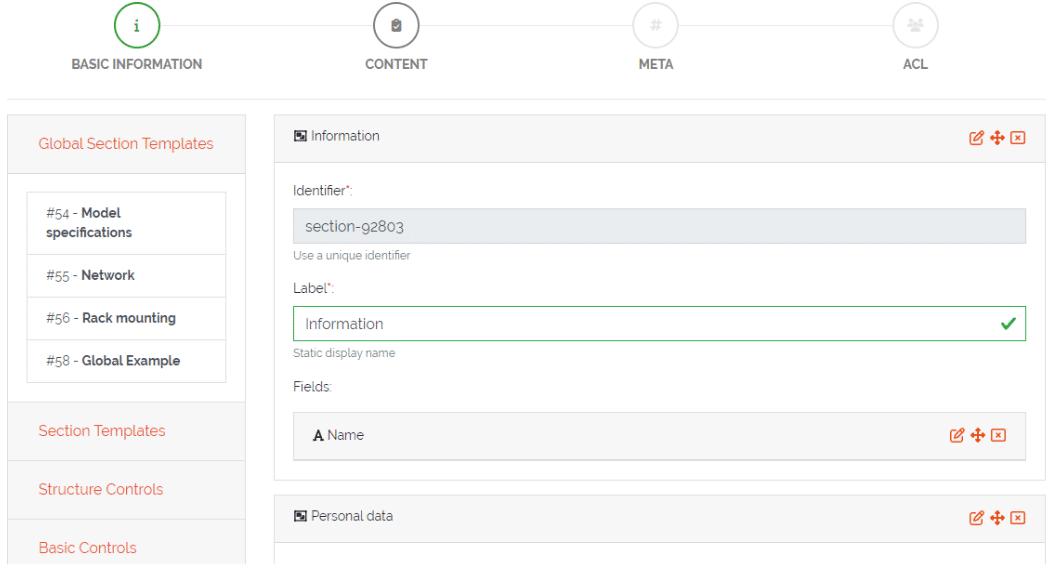
Image: Creation of a section template
Use section templates
Once the section templates have been created, they can be used in type configurations. There are two new areas in the sidebar of the type configuration, the ‘Global Section Templates’ area, which contains all global and predefined templates, and the ‘Section Templates’ area, which contains all standard section templates. They can be added to the type configuration via drag & drop, just like a new section is added. Global section templates cannot be edited in the type configuration.
Image: Use of section templates in the type configuration
Section template types
There are three different types of templates, each of which fulfils a specific purpose. Below you will find an overview of the features of the individual section template types.
Standard Section Templates
● It can be stored multiple times within the same type configuration if required
● After it has been dragged into the type configuration, it can be further modified and additional fields can be added or existing ones deleted.
● It can be converted into a global section template
● Changing a standard section template in the template configuration does not affect instances of the template that are already in use
● There is no programmatic connection between the standard section template and the type
Global section templates
● It can only be stored once within the same type configuration
● It can no longer be changed after it has been added to a type configuration
● Changes to the global section template in the template configuration affect all existing instances of the template
○ Example 1: Adding a field adds the new field to all existing instances of this template
○ Example 2: Removing a field also removes this field from all existing instances of this template (the saved value is lost)
○ Example 3: Deleting a global section template also deletes the section and its data from all types and objects that use it
● Types track all the global section templates they use
Predefined section templates
● They have the same properties as global section templates, but are supplied by DataGerry
● They cannot be edited or deleted by the user.
● Users can create a clone of a predefined section template, but the clone is no longer considered a predefined section template
Section Templates – Table Actions
Depending on the template type, there are different actions for created section templates. Below you will find an overview and an explanation of the individual topics.
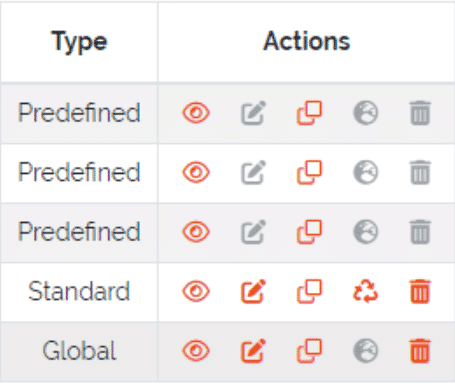
Image: Actions for created section templates
Actions
Open preview
Opens a preview of the section template that shows what the created section and its fields will look like.

Edit section template
Redirects the user to the editing form for the section templates. This action is not available for predefined templates. Editing a global section template in this form affects all types and objects that use this template.

Clone section template
This action allows users to create a clone of an existing template (including a predefined template). A pop-up window opens in which you can specify the name and type of the template. After confirmation, the clone is created. A cloned predefined template is either of type standard or global.

Transform standard template
This action can be used to convert a standard template into a global section template. When the template is converted, it is considered a new global section template, which means that the previous uses of this default template on types are not tracked. Users should bear in mind that this action cannot be undone. This action is only available for standard templates.

Indicator for global templates
This is only an indicator that this template type is ‘Global’ and should mean that this type cannot be transformed. All predefined templates are also global templates.

Delete template
Section templates can be deleted with this action. Please note that deleting a global section template also removes this and all set values of types and objects. The number of affected types and objects is displayed in the confirmation pop-up. Predefined templates cannot be deleted.

Section Templates – Rights
The area for managing section templates has its own set of rights.
base.framework.sectionTemplates.*
This permission grants all the below mentioned permissions and allows the user to do anything with the section templates
base.framework.sectionTemplates.view
This right is required to access the section template via Framework => Section Templates. It is also required for the “Open preview” action.
base.framework.sectionTemplates.create
This right is required to create new section templates. Together with base.framework.sectionTemplates.edit it is necessary to clone templates.
base.framework.sectionTemplates.edit
This right is required to edit existing section templates. Together with base.framework.sectionTemplates.create it is necessary to clone templates.
base.framework.sectionTemplates.delete
This right is required to delete existing section templates.
Changes in version 2.1.0
Thanks to feedback from the community and other sources, we were able to identify and fix several bugs to improve the user experience. A complete list of changes and bug fixes can be found in the DataGerry forum.
Changelog DataGerry 2.0
DataGerry 2.1.0 (deutsch)
[Neue Funktion]
Section Templates, welche über (Framework => Section Templates) aufgerufen werden können
[Neue Funktion]
Neuer Satz von Rechten für Section Templates
[Neue Funktion]
Der Location-Tab in der Seitenleiste hat einen “Toggle”-Button mit welchem die gesamte Seitenleiste genutzt werden kann, um Locations anzuzeigen
[Neue Funktion]
Es wurde ein Filter-Feld hinzugefügt, um nach bestimmten Locations suchen zu können
[Anpassung]
Die erstellten Typen durch den DATAGERRY Assistenten werden in Kategorien aufgeteilt
[Anpassung]
Die Status-Nachrichten wurden verschoben, um die Elemente oben rechts nicht zu überlappen
[Anpassung]
Felder und Sektionen bekommen beim Erstellen eine UUID anstatt der bisher verwendeten Zufallszahl
[Anpassung]
In der Objektübersicht-Tabelle kann für das jeweilige Objekt durch Klicken in die Zeile der “View Mode” aufgerufen werden. Durch einen Doppelklick öffnet sich der “Edit Mode”
[Anpassung]
Wenn ein Objekt gelöscht wird, dann werden alle Objekt-Links wo dieses Objekt verlinkt war gelöscht. Zusätzlich wird werden alle Referenzen auf dieses Objekt von den zugehörigen Typen und Objekten gelöscht
[Bugfix][DAT-286]
Objekt-Links werden gelöscht, wenn eins der Objekte gelöscht wird
[Bugfix][DAT-358]
In der Typ-Konfiguration ist das Feld “Reference type selections” für die Special Control “Reference” ein benötigtes Feld. Wenn dieses Feld nicht gesetzt wurde, dann konnten in der Objektansicht keine referenzierten Objekte ausgewählt werden
[Bugfix][DAT-440]
Die Übersicht von Select-Feldern zeigt nun korrekt das Label anstatt des Wertes an
[Bugfix][DAT-570]
Fehler behoben welcher auftrat, wenn der “Edit”-Button in der Kategorieübersicht gedrückt wurde
[Bugfix][DAT-571]
Fehler beseitigt der auftrat wenn das “Add Link” Popup in der Objektübersicht geschlossen wurde
[Bugfix][DAT-659]
Fehler beseitigt, dass nicht alle gesetzten Werte der Typ-Konfiguration gespeichert wurden
[Bugfix][DAT-660]
[Bugfix][DAT-660]
Fehler behoben durch den nicht mehr auf Unterkategorien zugegriffen werden konnte, wenn die übergeordnete Kategorie gelöscht wurde
[Bugfix][DAT-661]
Die Aktion “Copy to clipboard” für “Select”-Felder kopiert nun korrekt das Label anstatt des Wertes
[Bugfix][DAT-662]
Fehler behoben bei dem die App abgestürzt ist, wenn im “Add Link”-Popup kein Wert für das zu verlinkende Objekt eingetragen wurde
[Bugfix][DAT-667]
Die angezeigten Statusnachrichten können wieder durch Drücken von “X” geschlossen werden
[Bugfix][DAT-558]
Fehler behoben bei dem manchmal die “Root”-Location nicht automatisch in der Datenbank erstellt wurde
[Bugfix][DAT-697]
Fehler mit Basic Auth behoben
[Bugfix][DAT-439]
Mehrere Fehler im Bereich Objekt-Logs wurden behoben (Settings => Object Logs)
[Frontend]
Mehrere Pakete wurden geupdated, um Sicherheitslücken zu schließen
[Frontend]
Mehrere Pakete wurden geupdated in Vorbereitung die Codebase auf Angular 16 umzustellen, weil Angular 15 bald das EoL für security updates erreicht
[Backend]
Mehrere Pakete wurden geupdated um Sicherheitslücken zu schließen
[Backend]
Die für die Entwicklung verwendete Version von MongoDB wurde auf Version 6.0 erhöht, weil MongoDB 4.4 und relativ schnell danach MongoDB 5.0 das EoL erreichen. Die neueste Version ist aber mit MongoDB 4.4 und MongoDB 5.0 kompatibel.
DataGerry 2.0 (english)
[New feature]
Section Templates which can now be accessed from (Framework => Section Templates)
[New feature]
New set of rights for section templates
[New feature]
The Locations-tab in the sidebar has now a toggle button to use the complete sidebar while displaying locations
[New feature]
Added a filter field to search for specific locations
[Changed]
Created types by the assistant are now distributed over several categories
[Changed]
The status messages have been moved to stop blocking the buttons on the top bar
[Changed]
Fields and section identifiers are now getting an UUID instead of a random number
[Changed]
In the object list table an object’s “View Mode” can now be accessed by clicking once into the row and the “Edit Mode” can be accessed by double clicking the row of the object
[Changed]
When an object is deleted, all corresponding object links will be removed. Additionally the object reference will be removed from all other objects referencing the deleted object
[Bugfix][DAT-286]
Object Links are now deleted when one of the objects is deleted
[Bugfix][DAT-358]
In type configurations the field “Reference type selections” for the special control “Reference” is now a required field. When this field was not set, no objects were displayed for selection in object configurations
[Bugfix][DAT-440]
The overview of selection fields now display correctly the select-option label instead of the select-option-value
[Bugfix][DAT-570]
Fixed an error occurring when pressing the “Edit”-Button in the categories overview
[Bugfix][DAT-571]
Fixed an error occurring when closing the “Add Link” popup in the object overview
[Bugfix][DAT-659]
Fixed an issue where the values of fields (except name and label) of controls in type config were not saved in the database
[Bugfix][DAT-660]
Fixed a bug where subcategories were not accessible when the parent category got deleted
[Bugfix][DAT-661]
Fixed “Copy to clipboard” action for select fields taking the option value instead of the option label
[Bugfix][DAT-662]
Fixed a bug causing an application crash when adding an object link in the “Add link” popup but not providing a value
[Bugfix][DAT-667]
Fixed a bug where the status message popups in the top right corner could not be closed
[Bugfix][DAT-558]
Fixed an issue where sometimes the “Root”-Location was not automatically created in the database
[Bugfix][DAT-697]
Fixed an issue with basic auth not working as intended
[Bugfix][DAT-439]
Fixed the object logs section (Settings => Object Logs)
[Frontend]
Several package bumps to fix security issues
[Frontend]
Several package bumps in preparation to upgrade the codebase to Angular 16 since Angular 15 is about to reach EoL for security support
[Backend]
Several package bumps to fix security issues
[Backend]
The version of MongoDB for development is increased to 6.0 due the upcoming End of Life for MongoDB 4.4 and 5.0. There are currently no issues with MongoDB 4.4 and 5.0 and they should be compatible with the newest version of DataGerry