
Is your IT driving you crazy?
Open-Source CMDB Software: Centralized Documentation of IT Assets
With DataGerry, you can document your IT landscape where it matters most to your business: at the service level. The open-source CMDB (Configuration Management Database) links assets, configuration items, and dependencies into a reliable database: flexibly expandable, automatically updated, and ready for compliance.
Which DataGerry edition is right for you?
Community Edition
A free introduction to the open-source CMDB. Ideal for teams that want to install, operate, and customize DataGerry themselves to meet their own needs. Support is available through the community.
Self-Hosted Edition
The Professional Edition for use within your own CMDB infrastructure. You retain full data sovereignty and also receive vendor support, updates, and an expanded feature set. Ideal for companies with their own operational or compliance requirements.
Cloud Edition
A CMDB tool that’s ready to use right away—no need for your own servers or operational overhead. DataGerry handles hosting, updates, and maintenance, so you can focus on your data. Ideal for teams that want to get started quickly.
What is a CMDB?
A CMDB (Configuration Management Database) is a central database that documents all components of an IT environment and their relationships to one another. These components are called configuration items (CIs)—such as servers, applications, network devices, contracts, or IT services. Unlike a simple inventory list, a CMDB shows how these elements are connected: which service runs on which server, which application depends on which database, and who is responsible for each one.
What is a CMDB used for?
A CMDB serves as the foundation for nearly all IT processes that require reliable information about their own infrastructure:
- Resolve issues faster: In the event of an outage, dependencies immediately show which services and users are affected.
- Plan changes securely: Before implementing a change, you can see which systems will be affected by it.
- Demonstrate compliance: ISO 27001, NIS2, and IT-Grundschutz require an up-to-date inventory with assigned responsibilities.
- Manage costs and lifecycles: You know which hardware, software, and contracts are in use and when they expire.
- Support other tools: Ticketing, monitoring, and accounting systems all access the same, well-maintained database.
What sets modern open-source CMDB software apart?
Service-oriented
You start by modeling your IT services and assigning the technical components to them. This way, the CMDB captures what really matters for your IT documentation.
Flexible
Classes and fields can be expanded at any time. Your CMDB grows with your IT infrastructure, rather than forcing you into a rigid data model.
Automated
The integrated API platform OpenCelium enriches data from other systems and makes it available to external applications. Manual maintenance becomes the exception.
Structured
Templates and wizards simplify the setup process and provide a clear framework—even for teams with no CMDB experience.
Compliant
An ISMS compliant with ISO 27001 and NIS2 is an integral part of the platform. Risks are assessed directly at the CMDB’s assets and services.
Open Source
You retain full control over your data, avoid vendor lock-in, and can customize the platform to meet your needs.
Why Use an Open-Source CMDB Tool?
Commercial CMDB tools are often part of large ITSM suites—which come with corresponding licensing costs and vendor lock-in. An open-source CMDB like DataGerry, on the other hand, offers you:
- Transparency: The source code is openly accessible and verifiable.
- Data sovereignty: You decide where your data is stored—in your own data center or in the cloud.
- No vendor lock-in: Open interfaces and formats ensure your independence.
- Free to get started: With the Community Edition, you can get started without any licensing costs.
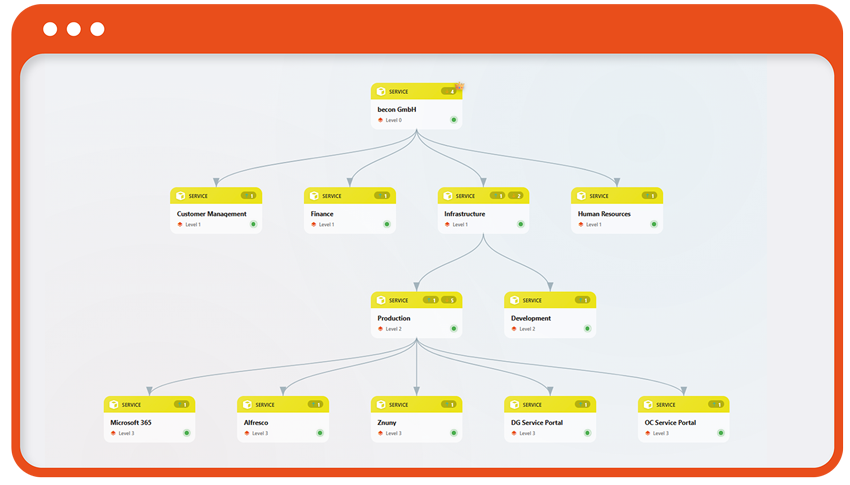
Build a Reliable CMDB in 4 Steps
1. Build a data model
Start with templates for typical CI classes or define your own model—from IT services to individual servers. The model can be expanded at any time as new requirements arise.
2. Connect Data
Connect existing sources using integrations and connectors, enrich your data, and automate updates. This keeps the CMDB up to date without anyone having to manually maintain lists.
3. Operationalize usage
Analyze impacts and dependencies, assess change risks, and generate audit reports and documentation at the click of a button.
4. Creating Added Value
Make your CMDB data available to other applications and processes—such as asset accounting, reporting platforms, ticketing systems, configuration management, and observability tools.

Build a Data Model

Connecting Data

Operationalize usage

Creating Added Value
CMDB with Integrated ISMS: Risk Analysis Directly at the Asset Level
Most companies maintain their CMDB and their Information Security Management System (ISMS) in separate tools. This leads to duplicate data entry, outdated asset lists, and risk assessments that do not reflect the actual IT landscape. DataGerry solves this problem: The ISMS, with integrated risk analysis, is an integral part of the CMDB. You assess risks right where your assets, configuration items, and services are already documented—in a single, always up-to-date database.
Your Benefits at a Glance
Risk Analysis Directly on the Asset:
Assess risks for individual assets or entire groups of assets without having to transfer data to a separate ISMS tool.
Probability and Impact Assessment:
A transparent methodology ensures consistent and comparable results.
Automatic Risk Calculation:
DataGerry automatically determines the risk level, saving you the trouble of manual calculations in spreadsheets.
Clear Responsibilities:
By defining the roles of “Risk Owner” and “Risk Assessor,” you clearly establish who assesses risks and who is responsible for managing them.
Ideal for ISO 27001, BSI IT-Grundschutz, and NIS2
Whether certification under ISO 27001, implementation of the BSI IT-Grundschutz, or compliance with the requirements of the NIS2 Directive—all standards require an up-to-date asset inventory and a documented risk assessment. By combining a CMDB and an ISMS, you can meet both requirements in a single system and have all supporting documentation immediately at hand during audits.
Which DataGerry editions include the ISMS?
In the DataGerry Cloud Edition , the ISMS module with risk analysis is always included. In the Self-Hosted Edition , it is available starting with the Medium version.
Are you ready to take control of your data?
Start your 14-day free trial of DataGerry today.
Try DataGerry, the open-source CMDB that brings structure and flexibility to your IT documentation. Discover powerful features, automate your workflows, and gain a complete overview of your assets—with no obligations.

FAQ – DataGerry CMDB
Please feel free to contact us
Contact the DataGerry team
Do you have any questions, or are you facing a particular challenge?
Our dedicated DataGerry team would be happy to assist you.
Office Address
Hauptstraße 8b, 82008 Unterhaching, Deutschland
Email
info@datagerry.com
Phone
+49 89 608668 0
Follow us on